 Hamza Ahmad
 An AI ad analyst the team messages on Instagram, and a Slack assistant that knows their numbers
A US wealth-education brand's marketing team wanted to study competitor ads, understand why they work, adapt the ideas in the founder's voice, and keep everything in a searchable swipe file. I built two agents on the client's own n8n Cloud, working inside their team as their automation and AI engineer.
The problem
Studying ads by hand was slow and inconsistent. The team wanted the hook, structure, CTA and persuasion angles of every ad they found, notes on what could be adapted, and compliance flags for aggressive wealth claims, all stored where anyone could search them.
Agent 1: the ad analyst
- Same brain, several mouths. One breakdown engine is fed by Instagram DMs and a Slack channel that accepts Meta Ad Library and Instagram links.
- Fast, verified webhooks. Meta's verification handshake and a 200 reply within the time limit, then work continues in the background.
- Route by input. Ad Library and Instagram links go to scrapers. A key finding: media shared by DM arrives as a direct file link, so that path skips scraping entirely.
- Transcribe video. Reels are transcribed with a polling loop capped at 20 tries. Images are analysed from the caption.
- Structured breakdown. Claude returns fixed fields: hook strategy, structure, CTA, content pillars, performance factors, adaptation notes and compliance flags. Reels get a variant that weights the first 3 seconds.
- Script writer (built, staged for release). A second agent writes an original script from the strategy fields only, never the competitor's words, using a vector search over the founder's own examples.
- Reply where it came from. A Slack thread reply, or a Quick Read DM under Instagram's 1,000-character limit. The full analysis stays in the sheet.
Agent 2: the Slack Instagram assistant
The social team asks plain questions in Slack ("How many followers did we gain this week?", "Give me 5 reel ideas based on what's working") and a Claude agent answers using 9 tools: live Instagram Graph API calls for posts, metrics, insights and comments, sheet lookups, a brand-knowledge search, and sub-workflows for weekly reports and inspiration-post analysis. A weekly run saves fresh reel ideas, and a side branch backfills post metrics whenever the agent looks them up.
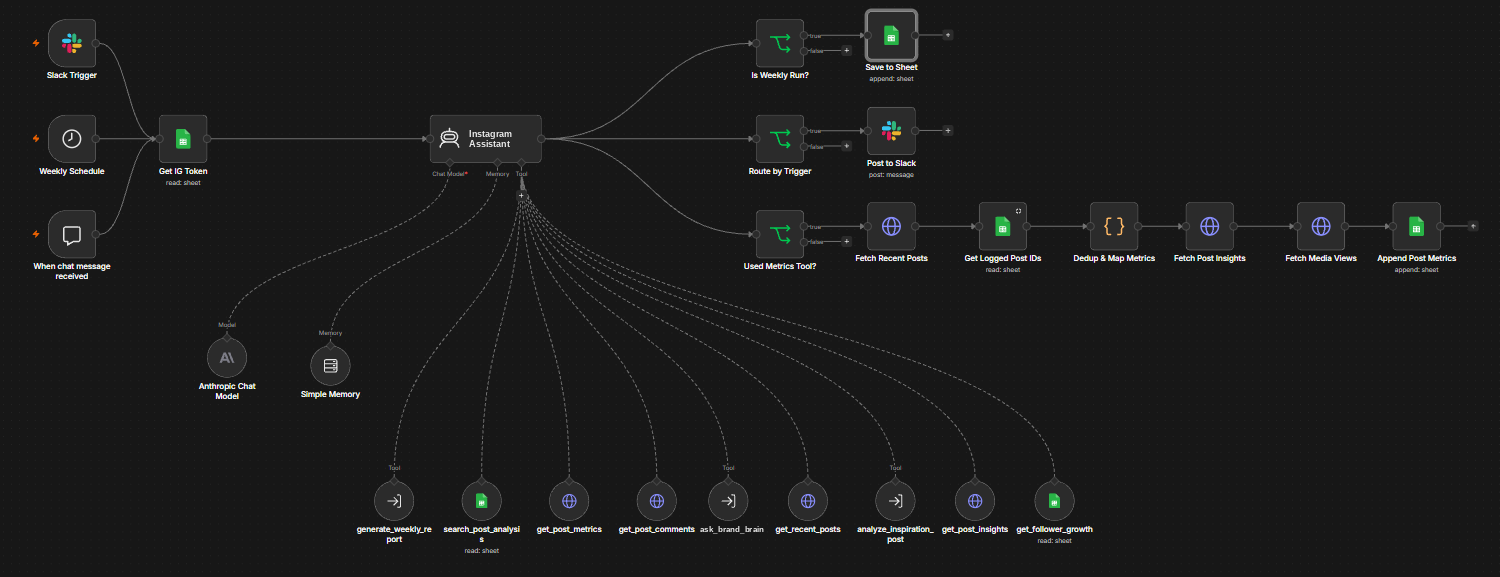
A production bug, fixed properly. The weekly reel ideas were landing as one blob in the Caption column, leaving Format, Hook, Angle and CTA empty. The fix was to make the agent return structured fields and map each one, not to patch the sheet.
Guardrails
Fail loud, not silent
If the brand-voice document can't be read, the script writer gets a clear "reference unavailable" marker and reports "not checked", instead of inventing its own rules.
Read rules whole
Compliance rules are read in full, not retrieved by similarity. A rule the search misses is a rule that doesn't exist.
No copying
The script writer never sees the competitor's transcript or hook, only the strategy, so it can't reproduce their words.
Safe change management
Every change staged on a draft version, a rollback ID recorded before each edit, and pinned test data before anything is wired live.
Results
- Both agents are live and used by the marketing team; the DM loop was validated end to end and replies in about 1–2 minutes.
- A 30-day token refresh workflow keeps Instagram access alive without anyone touching it.
- Repeat shares are deduplicated for 24 hours, skipping paid transcription and AI calls.
- A plain-English team guide explains what to send, what comes back and where it's stored.